
Overview: A forgotten Universal Account Number (UAN) password can prevent an employee from accessing the Employees’ Provident Fund Organisation (EPFO) Member Portal. The correct process depends on whether the existing password is known and whether the registered mobile number is accessible. This guide explains UAN password reset, recovery after a mobile-number change, common login problems and the employer’s role in maintaining accurate EPF and payroll records.
A UAN login problem is not always just a forgotten password. The registered mobile number may no longer be available, personal details may not match EPFO records, KYC information may require correction or the portal itself may be experiencing a technical issue.
The first step is therefore to identify the actual problem. A forgotten password can be addressed through the Forgot Password facility, while a changed mobile number requires the applicable recovery process offered by EPFO.
UAN activation is a separate process. EPFO currently directs members to use Aadhaar-based Face Authentication through the UMANG App for UAN activation. Password recovery, UAN activation and correction of EPFO records should not be treated as the same process.
What Is a UAN and Why Does It Matter?
The Universal Account Number is the common identifier associated with an employee’s EPF membership across different employments. An employee can have different employment-specific Member IDs while retaining the same UAN.
UAN access allows members to use eligible online services relating to their EPF records and claim status.
The employee’s UAN login credentials are personal. They are separate from the credentials used by an establishment to access the EPFO employer portal.
UAN Password Change vs Password Reset
A password change and a password reset are used in different situations.
| Particulars | Password Change | Password Reset |
|---|---|---|
| When to use | Existing password is known | Password is forgotten or cannot be used |
| Login required | Yes | No |
| Main route | Password-change facility after login | Forgot Password on Member Portal |
| Verification | Existing credentials and portal instructions | OTP and other verification, as applicable |
| Employer involvement | Normally not required | Normally not required unless records need correction |
| If the existing password is known, use the password-change facility after logging in. If it has been forgotten, use Forgot Password. | ||
What You Need Before Resetting Your UAN Password
Keep your UAN, access to the mobile number registered with your UAN and the captcha details ready.
The appropriate route depends on the problem:
| Situation | Appropriate action |
|---|---|
| Password forgotten and registered mobile is available | Use Forgot Password and verify the OTP |
| Registered mobile is no longer available | Follow the recovery route offered by EPFO |
| UAN is not activated | Use the applicable UAN activation service through UMANG |
| Personal or KYC details are incorrect | Follow the relevant EPFO correction process |
Is Aadhaar Mandatory for UAN Password Reset?
Aadhaar is not mandatory for every UAN password reset. The standard recovery process uses the mobile number registered with the UAN.
Where additional identity verification is required, the information and verification options displayed by EPFO should be followed. These requirements should not be confused with UAN activation, which currently uses Aadhaar-based Face Authentication through UMANG.
How to Reset Your UAN Password Online
Route 1: Registered Mobile Number Is Available
If you have forgotten your password but still have access to the mobile number registered with your UAN, the standard recovery process is straightforward.
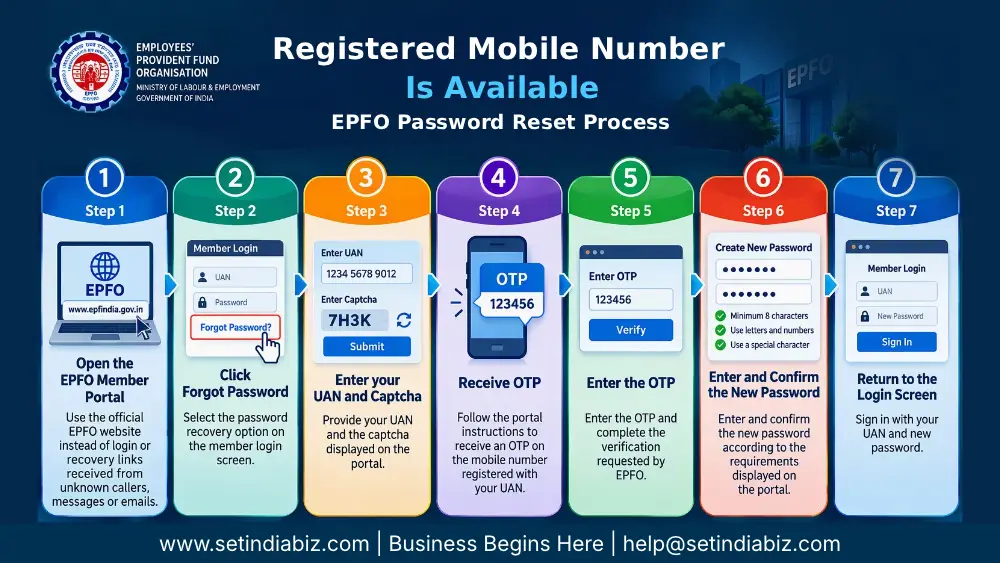
Step 1: Open the EPFO Member Portal. Use the official EPFO website instead of login or recovery links received from unknown callers, messages or emails.
Step 2: Click Forgot Password on the member login screen.
Step 3: Enter your UAN and the captcha displayed on the portal.
Step 4: Follow the portal instructions to receive an OTP on the mobile number registered with your UAN.
Step 5: Enter the OTP and complete the verification requested by EPFO.
Step 6: Enter and confirm the new password according to the requirements displayed on the portal.
Step 7: Return to the login screen and sign in with your UAN and new password.
The current Member Portal continues to provide the Forgot Password facility.
Route 2: Registered Mobile Number Is No Longer Available
A changed mobile number does not necessarily prevent you from recovering your UAN password.
EPFO’s recovery process may provide an option to use another mobile number where the registered number is no longer accessible. The member may be asked to provide personal details and complete the verification shown on the portal before the new mobile number can be used.
The process can involve:
- Entering your UAN and captcha.
- Selecting the option to use another mobile number, if displayed.
- Providing the personal details requested by EPFO.
- Allowing the details to be matched with EPFO records.
- Completing any Aadhaar or PAN-based KYC verification requested by the system.
- Entering the new mobile number and verifying the OTP.
- Creating a new password after successful verification.
The exact screens and verification requirements may change as EPFO updates its systems. Follow the instructions displayed on the live portal.
Important: Password recovery restores account access. It does not automatically correct inaccurate KYC, personal or employment records.
What If UAN Password Recovery Still Fails?
The solution depends on the underlying problem.
- Forgotten password: Use the Forgot Password facility.
- Changed mobile number: Use the applicable recovery route offered by EPFO.
- UAN not known: Use the Know Your UAN facility on the Member Portal.
- Personal details do not match: Follow the applicable correction process.
- KYC mismatch: Resolve the underlying KYC discrepancy separately.
- Portal unavailable: Check official EPFO notices and retry when the service is available.
EPFO has also advised members to avoid repeated attempts during periods of system disruption. The Member Portal currently carries a notice asking members to avoid repeated attempts to access services during peak hours or submitting repeated requests while services stabilise.
How to Change Your UAN Password After Login
A password reset is unnecessary if you know your existing password.
- Log in to the EPFO Member Portal.
- Open the account or profile section.
- Locate the password-change option available in the current interface.
- Enter the existing and new passwords as requested.
- Confirm the change and follow the instructions displayed on the portal.
EPFO may change the portal interface, so the location of the option can vary. Follow the menu available in your authenticated account.
Common UAN Password Problems and Solutions
| Problem | Possible reason | What to do |
|---|---|---|
| OTP not received | SMS delay, network issue or incorrect registered number | Check mobile access and retry |
| Registered number changed | OTP is directed to the old number | Use the applicable recovery process |
| Name or date of birth mismatch | Details differ from EPFO records | Follow the applicable correction process |
| KYC mismatch | Identity details do not match records | Resolve the underlying KYC issue |
| Login fails after reset | Incorrect credentials or technical issue | Re-enter details and check official notices |
| Portal unavailable | Maintenance or technical disruption | Retry after checking EPFO updates |
| EPFO currently displays 14470 as the member helpdesk number on the Member Portal. | ||
UAN Password Security: Important Precautions
A UAN account contains personal employment and provident fund information. Members should therefore treat their login credentials and verification details as confidential.
- Never share your UAN password or OTP.
- Do not disclose Aadhaar, PAN or bank details to unknown callers.
- Use a strong password and avoid easily guessed credentials.
- Access EPFO and UMANG services through official channels.
- Do not pay anyone promising faster UAN activation, password recovery or PF withdrawal.
EPFO currently warns members against credential theft and states that it does not request personal information such as Aadhaar, PAN or bank details over the phone or ask members to make monetary deposits.
UAN and EPF Compliance for Employers and HR Teams
UAN management forms part of an employer’s wider EPFO compliance responsibilities.
A password problem is normally an employee-facing issue. Employer involvement becomes relevant when the underlying problem concerns employee onboarding, UAN linkage, KYC information, payroll data, PF contributions or statutory records.
HR and payroll teams should monitor:
- Correct UAN details during employee onboarding.
- Proper linkage of the employee’s current employment with the relevant UAN.
- Accurate employee and employment information.
- Relevant KYC documentation and record consistency.
- Monthly EPF contributions and Electronic Challan-cum-Return (ECR) filing.
- PF transfers and related statutory services.
- Timely correction of discrepancies in employer-controlled records.
SetIndiaBiz’s payroll services cover PF UAN allotment, PF ECR filing, employee PF transfers, Employees’ State Insurance (ESI) number allotment, ESI return filing, KYC-related support and ongoing PF compliance.
An employer maintains employment, payroll and statutory records. That does not make the employer the custodian of an employee’s personal UAN password.
When Should an Employee or Employer Seek Assistance?
Employees should seek further assistance if they cannot access their registered mobile number, cannot identify their UAN, face repeated verification failures or find that their personal information does not match EPFO records.
Employers and HR teams should investigate incorrect onboarding information, UAN-to-employment linkage, payroll discrepancies, KYC-related issues, contribution filing and other statutory records.
Password recovery deals with account access. Record correction deals with inaccurate information. The appropriate process should be followed for each problem.
Key Points to Remember
- Use Forgot Password when you cannot remember your UAN password.
- Use the password-change facility after login if you know the existing password.
- If your registered mobile number has changed, follow the recovery process offered by EPFO.
- Aadhaar is not a universal prerequisite for every UAN password reset.
- UAN activation is separate from password recovery and currently uses Aadhaar-based Face Authentication through UMANG.
- Password recovery does not automatically correct KYC or employment records.
- Employees manage their personal credentials, while employers maintain employment, payroll and statutory records.
SetIndiaBiz Support
UAN password recovery is primarily an employee-facing process. The business-side responsibility is different: employers must maintain accurate employee information, process payroll correctly, manage applicable PF and ESI obligations and keep statutory records consistent.
A UAN mismatch can sometimes point to a wider onboarding or payroll-record issue. Incorrect UAN linkage, KYC information, contribution data or ECR filings cannot be solved by changing a password alone.
SetIndiaBiz supports businesses with payroll and EPF compliance services, covering PF UAN allotment, PF ECR filing, employee PF transfers, KYC-related processes and ESI compliance. Our experts can also assist with the wider compliance work involved in employee onboarding, payroll records and ongoing statutory filings.
If your business manages employees and statutory payroll obligations, contact SetIndiaBiz executives today to handle the compliance work behind these records, allowing your HR and management teams to focus on running the business.
FAQ’s
Open the official EPFO Member Portal, select Forgot Password, enter your UAN and captcha, complete the applicable verification and create a new password.
Check whether your registered mobile number is active and can receive SMS messages. If the number has changed, use the applicable recovery route offered by EPFO.
A changed mobile number does not necessarily prevent password recovery. Follow the recovery options displayed by EPFO and complete any additional verification requested.
No. Aadhaar is not mandatory for every password reset. The standard recovery process uses the mobile number registered with the UAN. Additional identity verification may be required in specific recovery situations.
Employees normally manage their own password recovery through the Member Portal. Employers are responsible for applicable employment records, UAN linkage, payroll and statutory EPF compliance.
No. UAN activation and password recovery are separate processes. EPFO currently directs members to use Aadhaar-based Face Authentication through the UMANG App for UAN activation.
The EPFO Member Portal currently displays 14470 as the member helpdesk number.
