
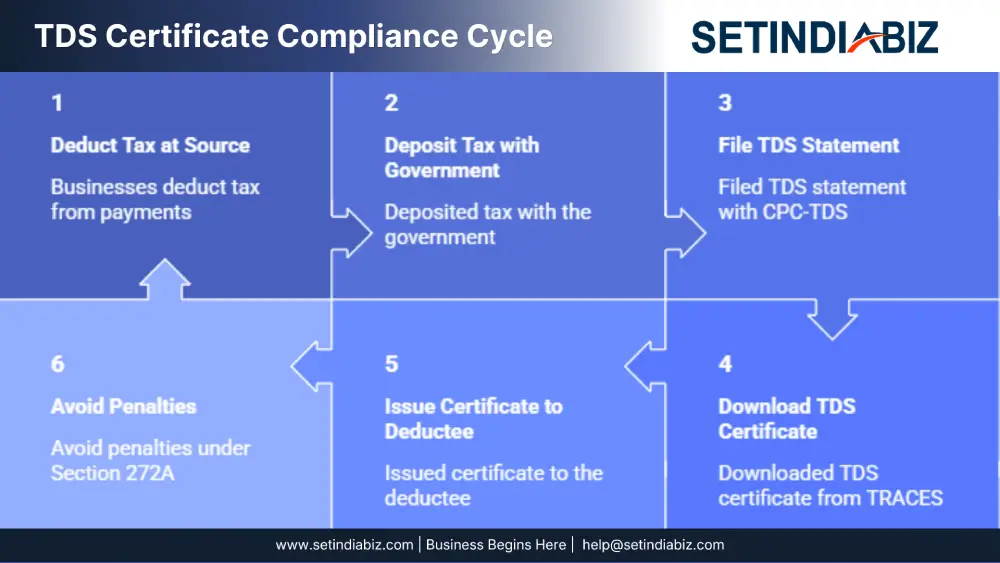
Introduction: Avoid penalties under Section 272A. learn the mandatory process, due dates, and best practices for issuing valid TDS certificates. Every business or individual who deducts tax at source (TDS)carries a dual responsibility — first, to deposit the deducted tax with the government, and second, to issue a valid TDS certificate to the deductee. While the first step is widely understood, the second is often overlooked, leading to unnecessary penalties and compliance notices. 📌
In recent months, the Centralised Processing Cell (CPC-TDS) has been sending out “Alert Notification” emails to deductors, reminding them that although they have filed their TDS statements for Quarter 3 of FY 2025-26, the corresponding TDS Certificates in Form 16A have not yet been downloaded from the TRACES portal. If you have received such an intimation, this guide will walk you through what Form 16A is, why it must be downloaded only from TRACES, the due dates, the applicable penalties, and the exact step-by-step process to download it.
What is Form 16A?
Form 16A is the official TDS certificate issued for tax deducted on payments other than salary. While Form 16 is issued by employers for salary payments, Form 16A applies to a much wider range of transactions, such as:
- Professional or technical fees (Section 194J)
- Rent payments (Section 194-I)
- Commission and brokerage (Section 194H)
- Contractor and sub-contractor payments (Section 194C)
- Interest other than on securities (Section 194A)
- Payments to non-residents (Section 195)
Form 16A serves as proof that the deductor has deducted tax and deposited it with the government against the deductee’s PAN. The deductee uses this certificate to claim TDS credit while filing their income tax return.
Why Downloading from TRACES is Mandatory
Many deductors still prepare TDS certificates manually using accounting software or Excel templates. However, this is no longer legally valid. The Central Board of Direct Taxes (CBDT) has clarified through multiple circulars that Form 16A must be generated and downloaded only from the TRACES portal. The key governing circulars are:
- Circular No. 03/2011 dated 13.05.2011
- Circular No. 01/2012 dated 09.04.2012
- Circular No. 04/2013 dated 17.04.2013
These circulars collectively make it compulsory for all deductors to issue Form 16A only after downloading it from the TRACES portal (www.tdscpc.gov.in). Any certificate issued in any other format — even if it contains accurate data — will be treated as invalid and non-compliant with the Income Tax Act, 1961.
Due Date for Issuing TDS Certificates
The due date for issuing Form 16A is governed by Section 203 of the Income Tax Act, 1961, read with Rule 31 of the Income Tax Rules, 1962. The rule requires the deductor to furnish the TDS certificate within 15 days from the due date of filing the TDS statement.
For non-salary TDS (Form 26Q/27Q), the timelines for FY 2025-26 are
| Quarter | Period Covered | TDS Return Due Date | Form 16A Due Date |
|---|---|---|---|
| Q1 | Apr – Jun 2025 | 31st July 2025 | 15th August 2025 |
| Q2 | Jul – Sep 2025 | 31st October 2025 | 15th November 2025 |
| Q3 | Oct – Dec 2025 | 31st January 2026 | 15th February 2026* |
| Q4 | Jan – Mar 2026 | 31st May 2026 | 15th June 2026 |
*Q3 FY 2025-26 deadline extended to 31 March 2026 vide CBDT Circular No. 02/2026. Missing these dates not only delays the deductee’s tax credit but also exposes the deductor to penalty proceedings.
Penalty for Non-Compliance
Failure to issue Form 16A within the prescribed time attracts a penalty under Section 272A(2)(g) of the Income Tax Act, 1961. The penalty is ₹500 per day (revised from ₹100 by the Finance Act, 2022) for every day the default continues, subject to a maximum of the amount of tax deductible.
While ₹500 per day may appear small, the cumulative impact across multiple deductees and multiple quarters can run into lakhs of rupees. Repeated defaults also invite scrutiny from the Assessing Officer and may impact the deductor’s overall compliance rating.
Prerequisites Before Downloading Form 16A
- The deductor is registered on the TRACES portal with a valid TAN.
- The TDS statement (Form 26Q for residents or Form 27Q for non-residents) for the relevant quarter has been successfully filed.
- The statement has been processed by CPC, and a “Statement Processed with Default/Without Default” status is reflected.
- KYC details (PAN, challan, and deduction details) are available for validation.
- A Digital Signature Certificate (DSC) is registered on TRACES if you wish to use the DSC-based KYC mode.
Step-by-Step Process to Download Form 16A from TRACES
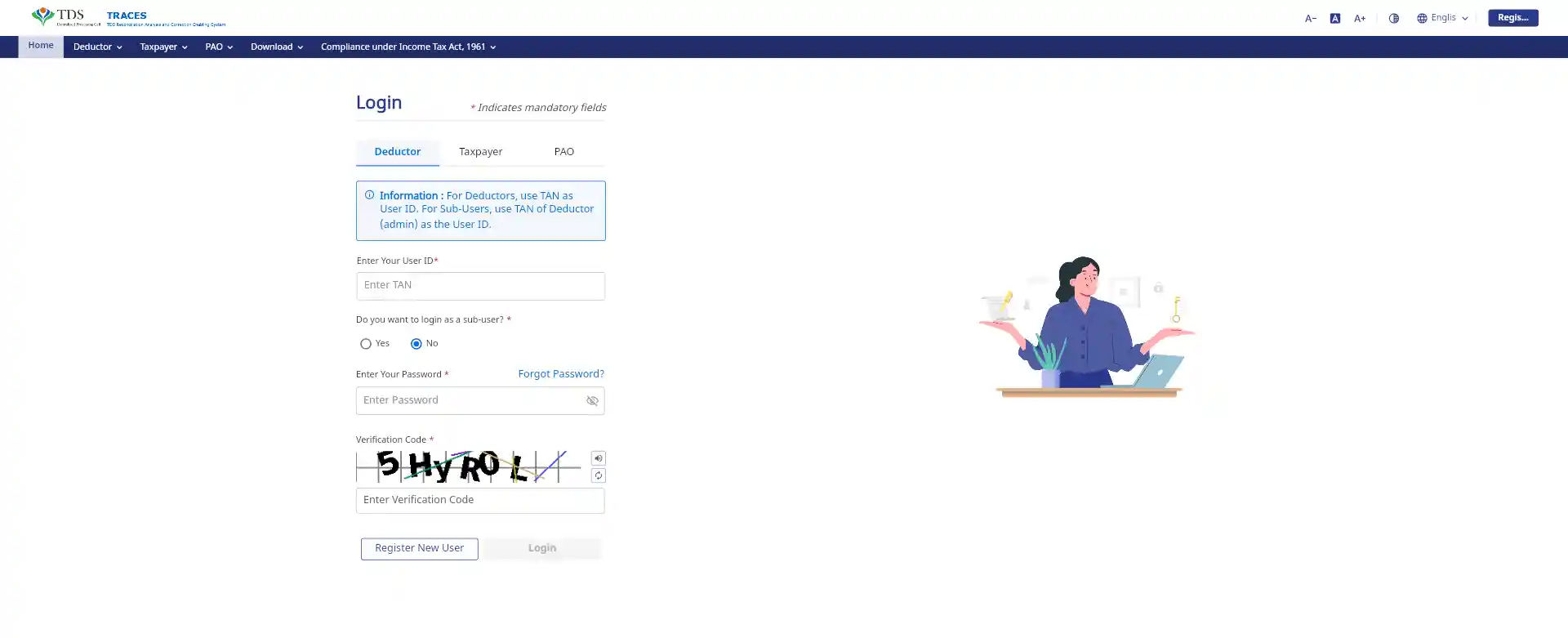
Step 1: Log in to TRACES
Visit www.tdscpc.gov.in and log in as a “Deductor” using your User ID, password, and TAN.
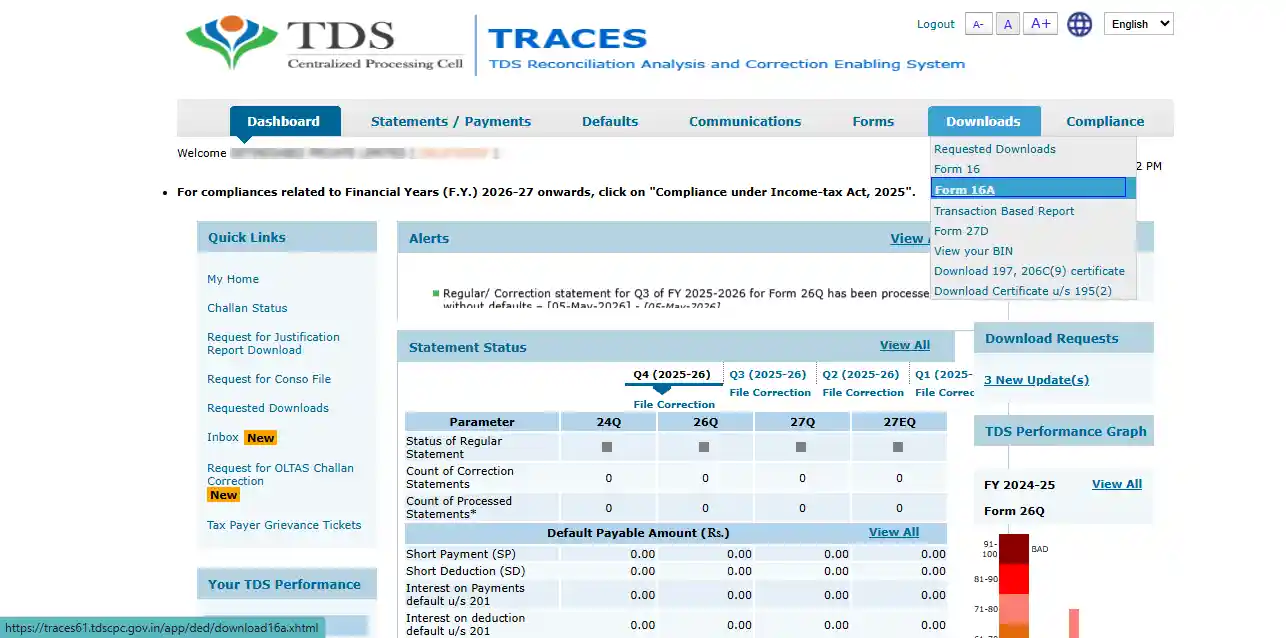
Step 2: Navigate to the Download Section
From the top menu, click on Downloads → Form 16A
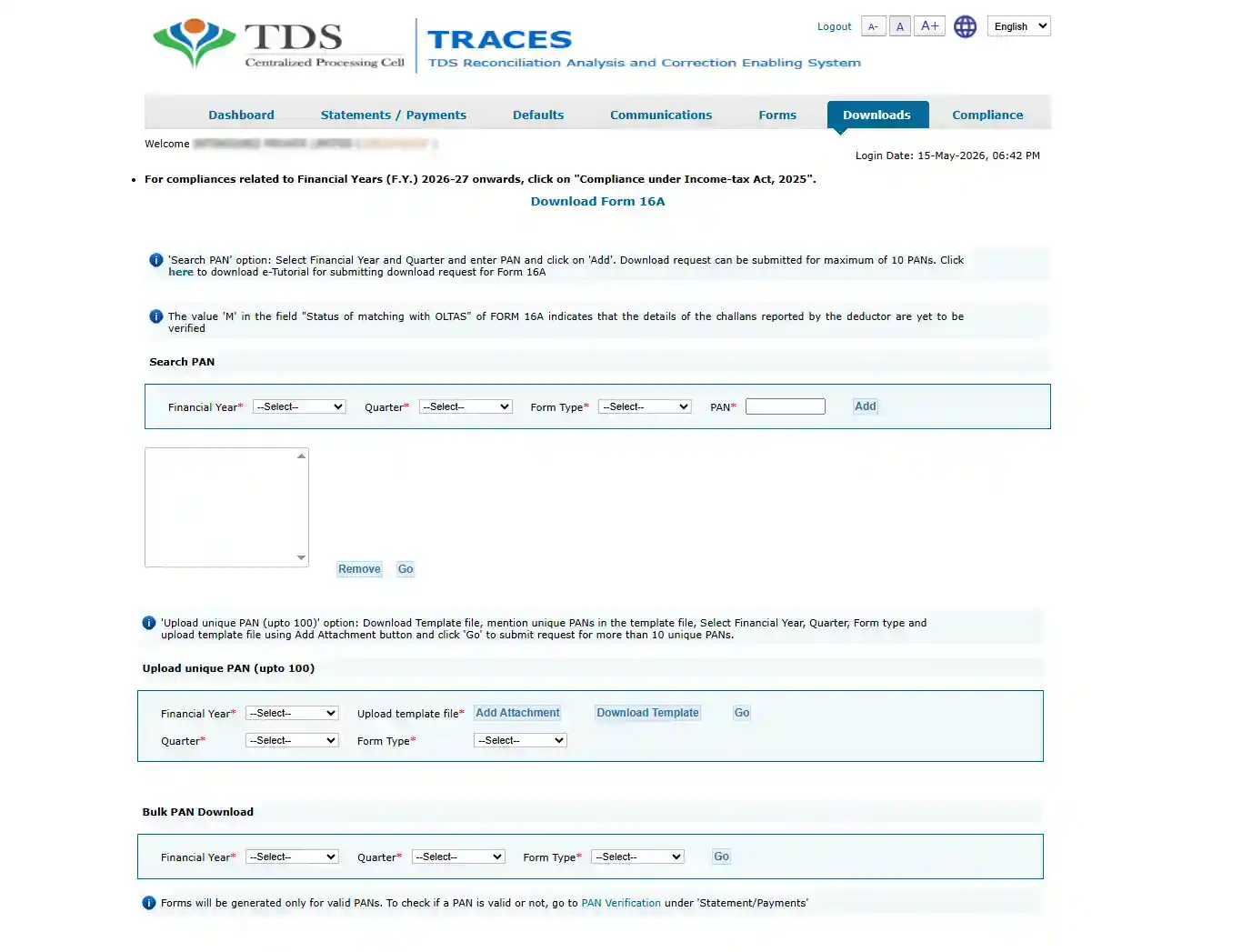
Step 3: Select the Search Criteria
Choose the Financial Year, Quarter, and Form Type (26Q or 27Q) for which you want to download the certificate. You can opt for a “Search PAN download” (for specific deductees) or a “Bulk PAN download” (for all deductees in the quarter)
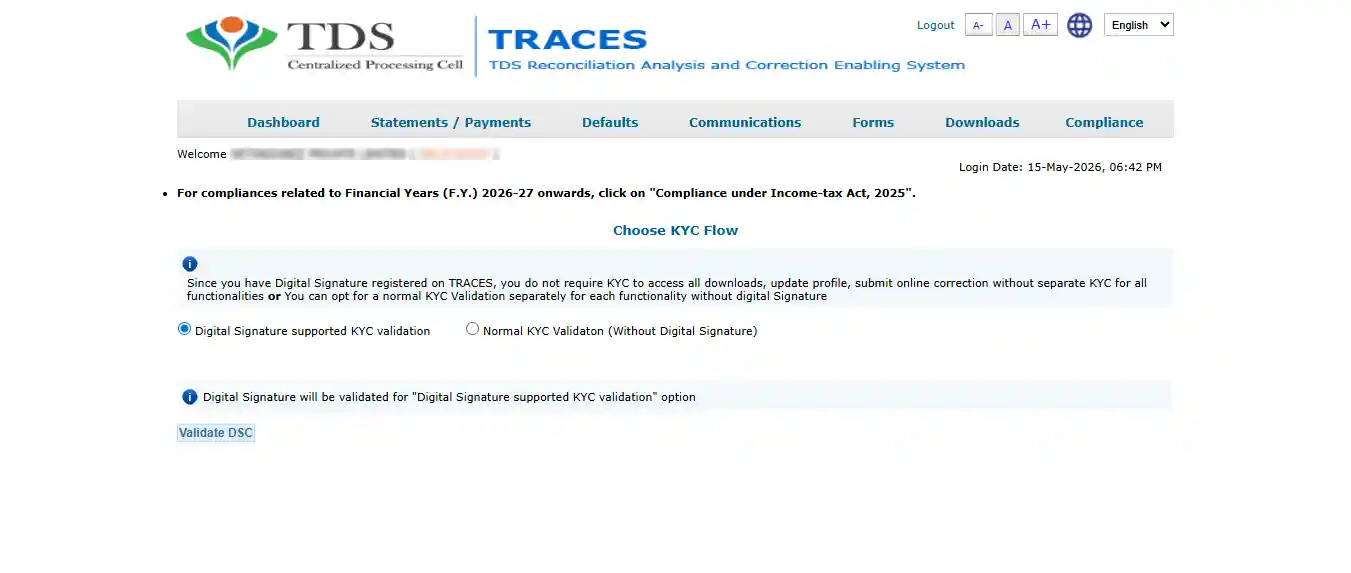
Step 4: Complete KYC Validation
You will be prompted to validate your identity through one of two modes:
KYC with DSC — uses your registered Digital Signature Certificate.
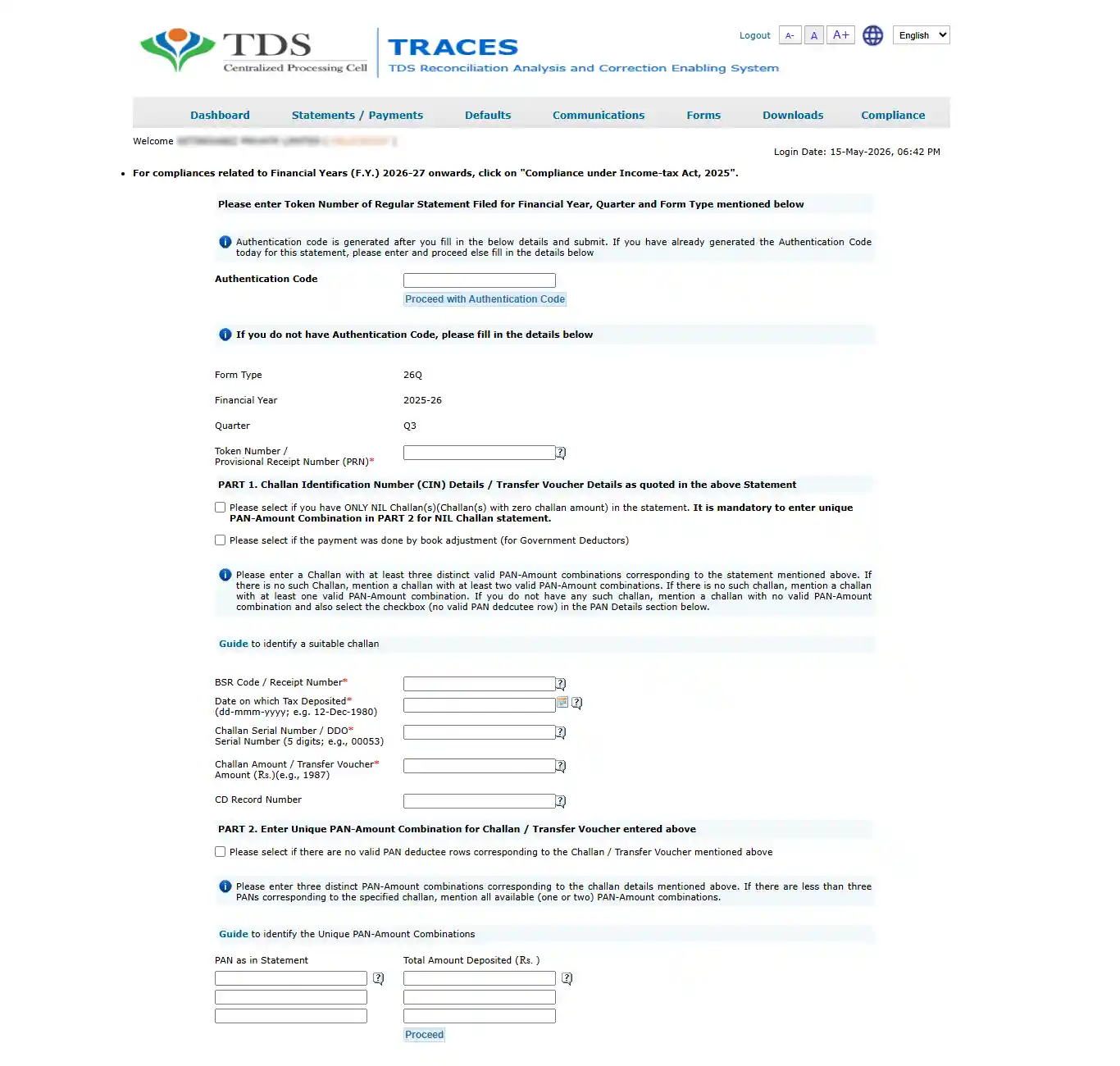
Normal KYC (without DSC) — requires entering a Token Number of the filed statement and challan-deduction details.
Step 5: Submit the Request
Once KYC is validated, submit the request. A Request Number will be generated. Note this down for tracking.
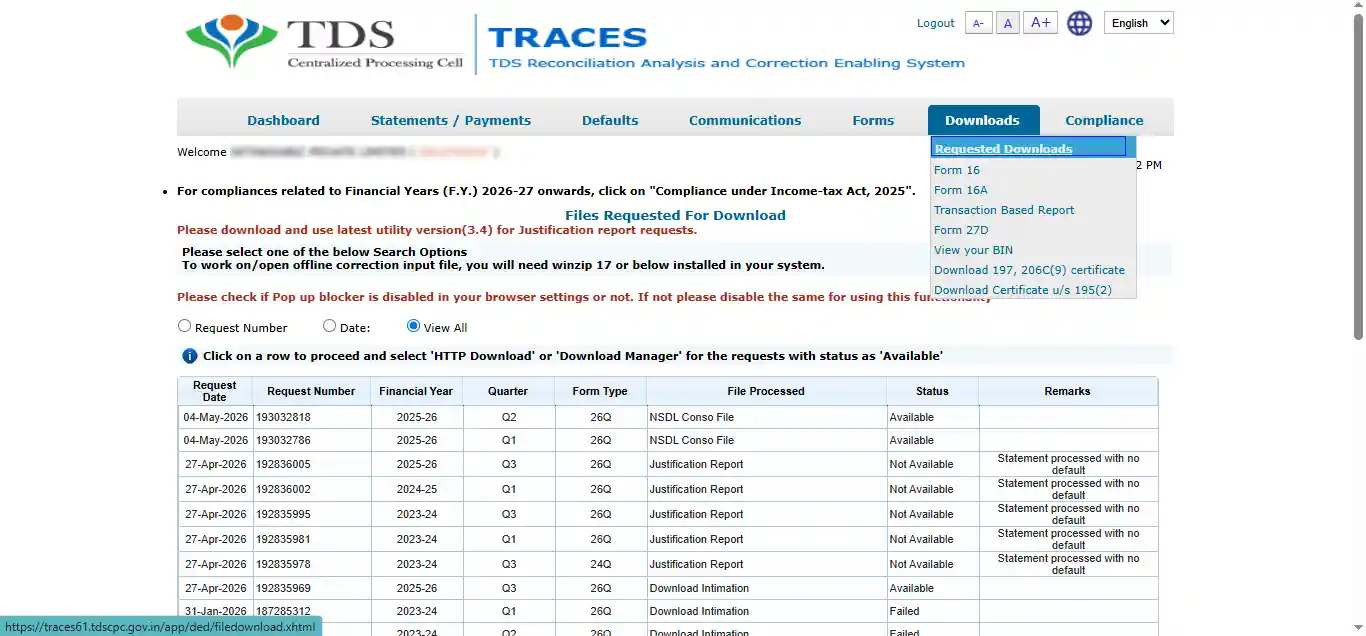
Step 6: Check Request Status
Go to Downloads → Requested Downloads. The status will initially show as “Submitted” and will eventually change to “Available” once processed (usually within a few hours)
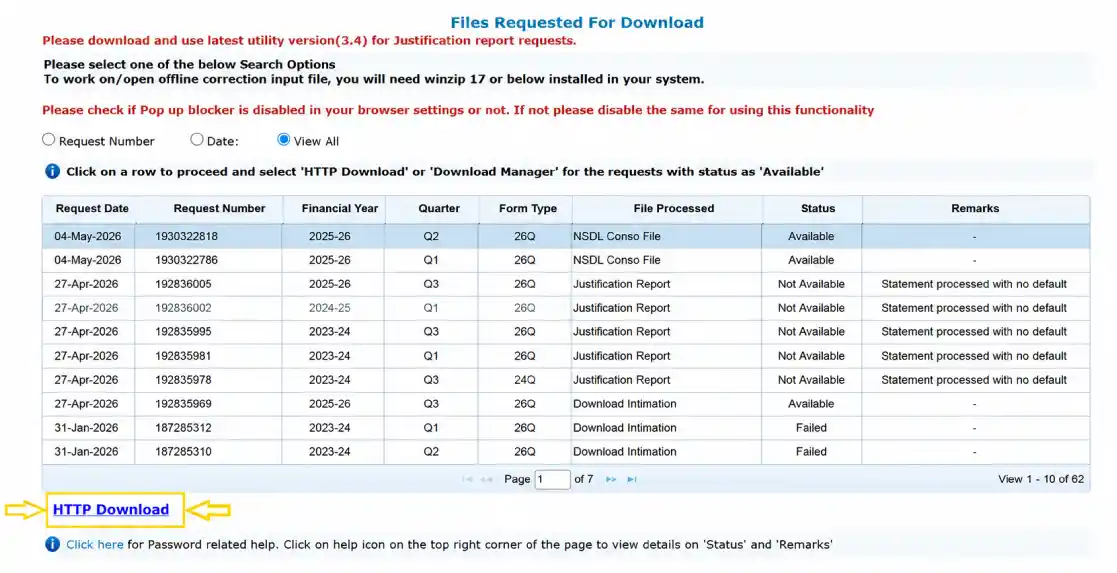
Step 7: Download the File
Once the status shows “Available,” download the file using the HTTP Download option (suitable for smaller files) or the Download Manager (for larger files).
Using the TRACES PDF Converter Utility: The file downloaded from TRACES is in a compressed text format and cannot be issued directly. You must convert it into a signed PDF certificate using the TRACES PDF Generation Utility, which can be downloaded for free from the TRACES portal under Requested Downloads.
Steps to convert:
- Open the utility on your computer.
- Browse and select the downloaded ZIP file.
- Enter the password (the TAN of the deductor in capital letters).
- Choose whether to digitally sign the PDFs (recommended) or generate unsigned PDFs.
- Click Proceed — individual PDFs for each deductee will be generated in the output folder.
These PDFs are the valid Form 16A certificates that must be shared with the deductees.
Conclusion
Downloading Form 16A from TRACES is not a clerical formality — it is a statutory obligation backed by clear timelines and monetary penalties. By understanding the rules, following the correct procedure, and adopting good compliance habits, deductors can not only avoid penalties under Section 272A(2)(g) but also build trust with their vendors and contractors who rely on these certificates to claim their rightful tax credit.
Frequently Asked Questions
Is Form 16A different from Form 26AS?
Can I issue Form 16A manually using my accounting software?
What should I do if my TDS statement is not yet processed?
Can I issue a single consolidated Form 16A for the whole year?
What if I notice an error in a downloaded Form 16A?
In This Article
Author Bio

Setindiabiz Editorial Team is a multidisciplinary collective of Chartered Accountants, Company Secretaries, and Advocates offering authoritative insights on India’s regulatory and business landscape. With decades of experience in compliance, taxation, and advisory, they empower entrepreneurs and enterprises to make informed decisions.
